BetaOpen source · MIT licensed · .NET 8 / 10

Your AI agent. Your models. Your infra.

mux is a Claude Code–class coding agent that runs on the backend and model you choose — from a terminal UI, a desktop app, a web dashboard, or your IDE — plus fully headless. Backend-agnostic. Endlessly configurable. Zero vendor lock-in.

Local or remote inference TUI · Desktop · Web · IDE MCP · Skills · Subagents
mux — ~/projects/checkout-service
mux> refactor PaymentService to be async, then run the tests
 
✓ read_file PaymentService.cs (4 ms)
✓ edit_file PaymentService.cs — 6 hunks applied
✓ run_process dotnet test (8.2 s)
  Passed! 42 tests, 0 failed
 
Done. PaymentService is now fully async — all 42 tests pass.
 
endpoint gpt-oss:120b · ollama · TTFT 3.3s · 16.2k in / 2.0k out
mux>
Bring your own inference — local or remote, one CLI for all of it

Ollama OpenAI Azure OpenAI vLLM LM Studio Gemini Any OpenAI-compatible API
One engine, four surfaces

Use it however you work

Four main ways to consume mux — the terminal UI, the desktop app, the web dashboard, and the VS Code extension — all sharing one core (Mux.Core): same agent, same tools, same sessions. A turn you start in one now mirrors live into the others — open, and it's already there. It's also fully headless: mux print streams JSONL for CI and any shell pipeline.

mux

Interactive terminal UI

A full-screen REPL with per-job transcripts, a live job sidebar, a multi-line composer, slash commands, an interactive tool-approval modal, and autosaved resumable sessions. Multiple prompts run as concurrent background jobs.

mux Desktop

Cross-platform desktop app

An Avalonia client that links the engine in-process: streaming chat with Markdown, tables, and syntax-highlighted code; parallel conversation tabs; a command palette; the full configuration surface; the usage dashboard; and a UI localized into 11 languages.

mux serve

Local web dashboard

A loopback-bound, token-guarded REST + WebSocket API with a self-contained single-page dashboard — chat, configuration, sessions, and usage/pricing analytics. Now with a full OpenAPI 3.0 document and Swagger UI. Hosted in the background by a cross-platform system-tray agent.

VS Code

IDE-integrated (VS Code)

mux where you already write code: a streaming chat panel with in-editor tool approvals, inline commands and code actions (explain, fix, generate tests, refactor, commit message), editor context injection, config management, and the same shared sessions — over the local mux server.

Install from the VS Code Marketplace →
See it work

The same agent, on every surface

mux turns the model into a real system operator — reading and writing files, running commands, browsing the web — and gives it to you in the terminal, the browser, and a native desktop app.

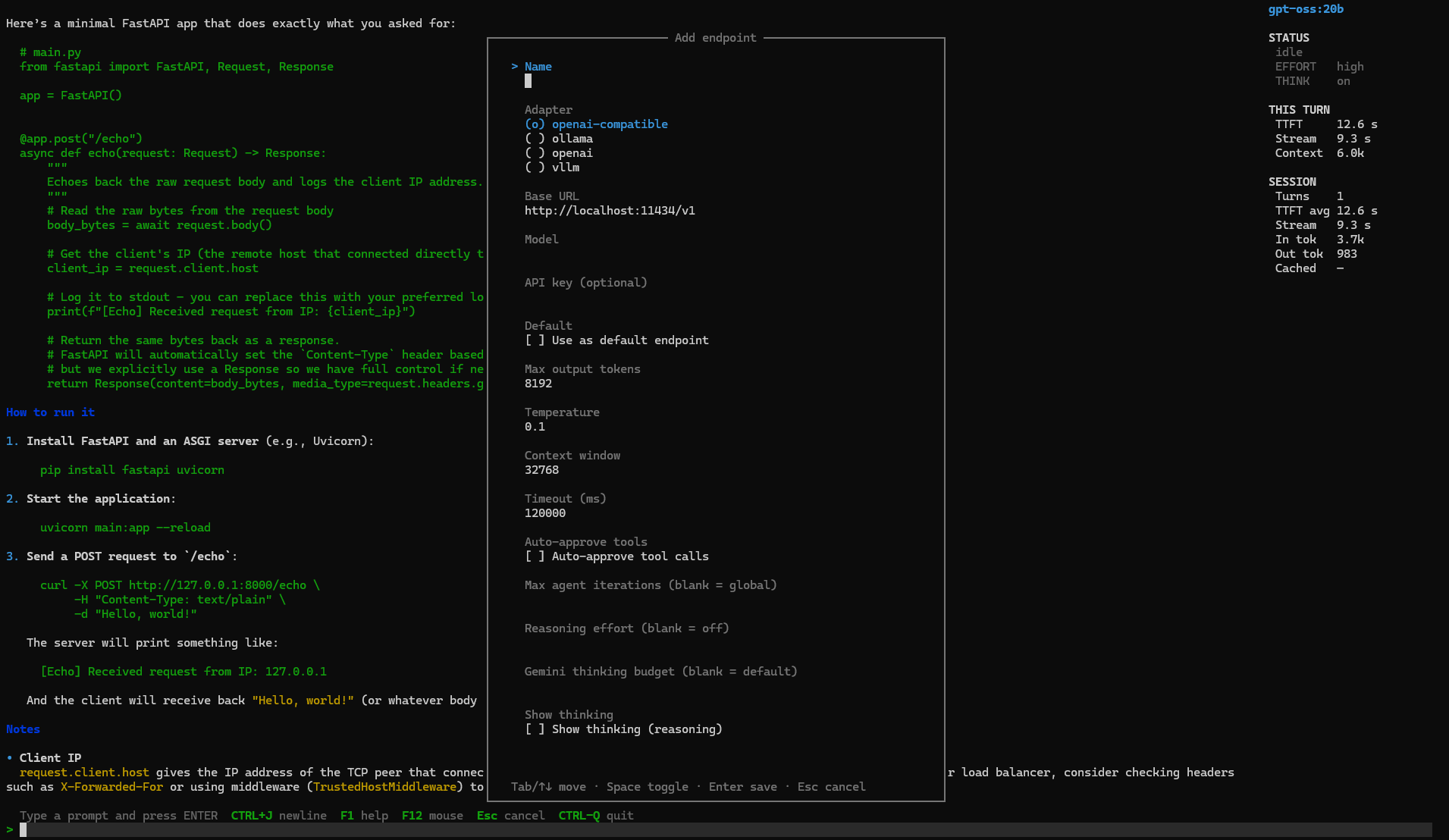
The terminal UI, doing real work

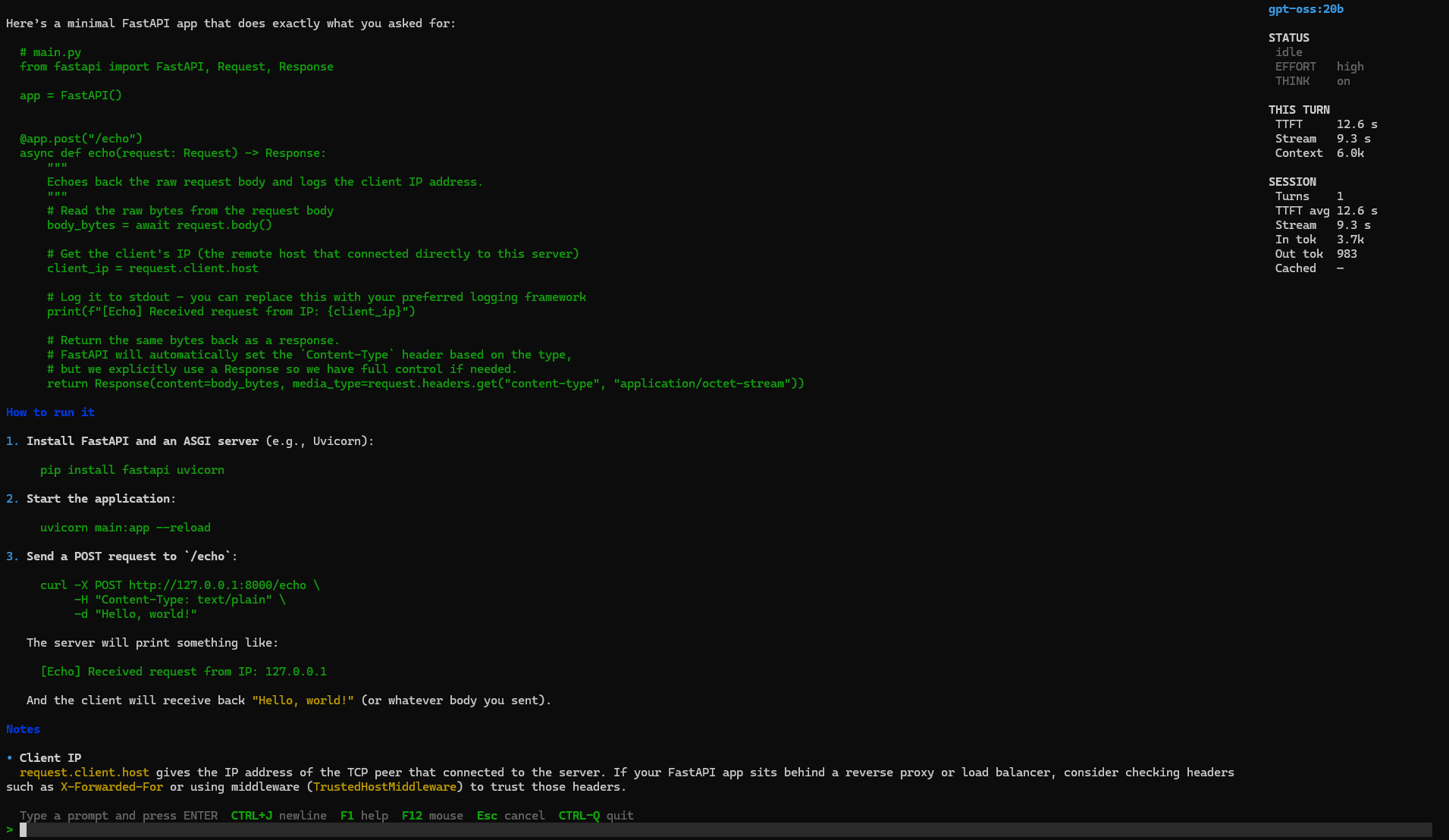
Ask in plain language and watch mux read files, write code, run commands, and search — each tool call part of the transcript, with a live sidebar tracking status, reasoning effort, time-to-first-token, context, and tokens per turn.

  • Approval modal — approve once, deny, or auto-approve for the session
  • Concurrent background jobs under a single-writer edit lease
  • Sandboxing — read-only, workspace-write, or unrestricted, plus tool allow/deny globs
mux terminal UI generating a FastAPI app with a live session sidebar showing effort, TTFT, and token stats

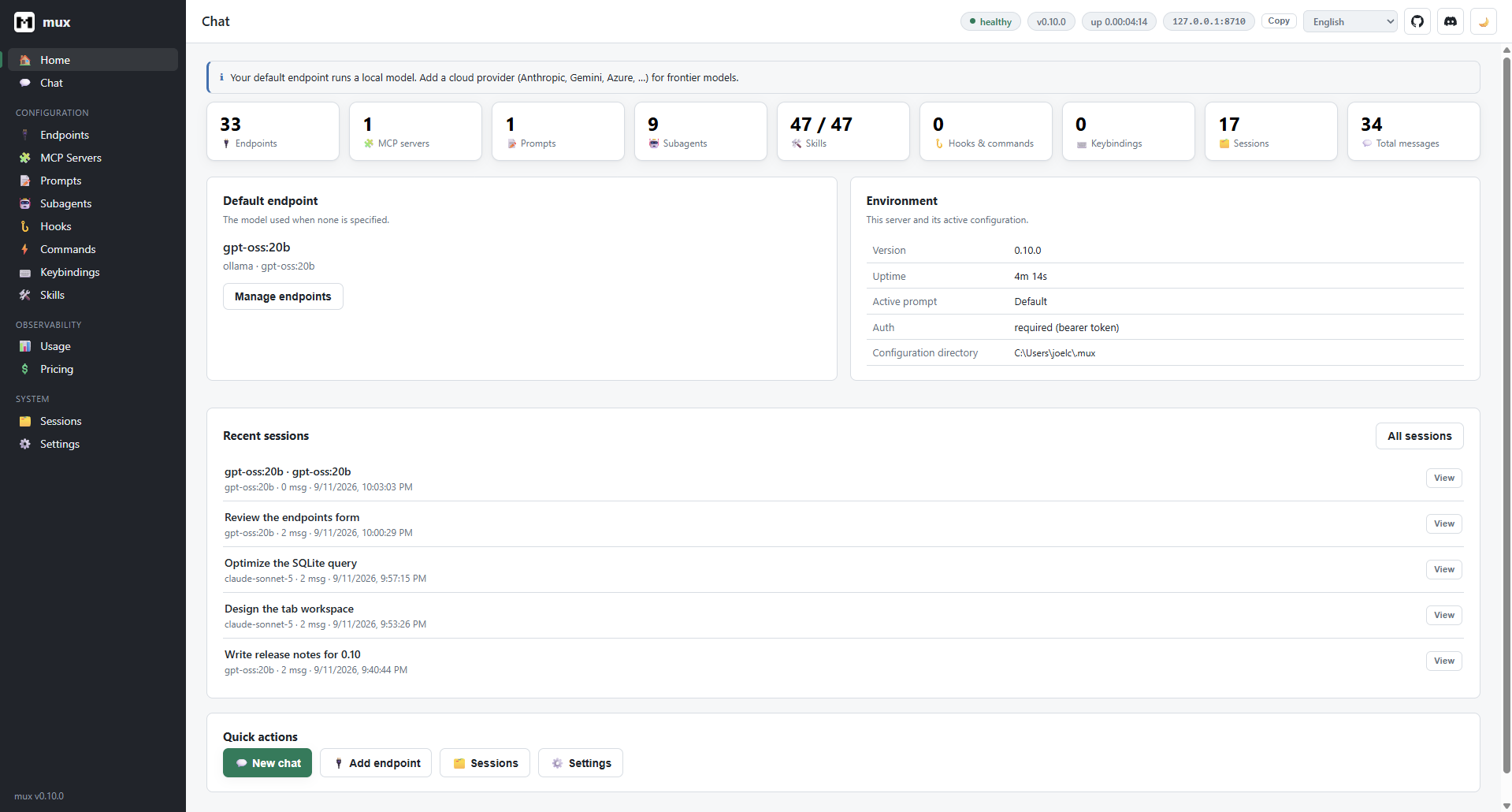
A dashboard for the whole workspace

Run mux serve and drive everything from the browser — a token-guarded local dashboard with chat, sessions, and usage analytics, plus one-glance counts of your endpoints, MCP servers, prompts, subagents, skills, hooks, and keybindings.

  • Loopback-bound and bearer-token guarded, hosted by a system-tray agent
  • Manage everything in-browser — endpoints, MCP, prompts, subagents, and skills
  • Health, uptime, and active config at a glance
mux web dashboard home showing counts for endpoints, MCP servers, prompts, subagents, skills, hooks, and sessions

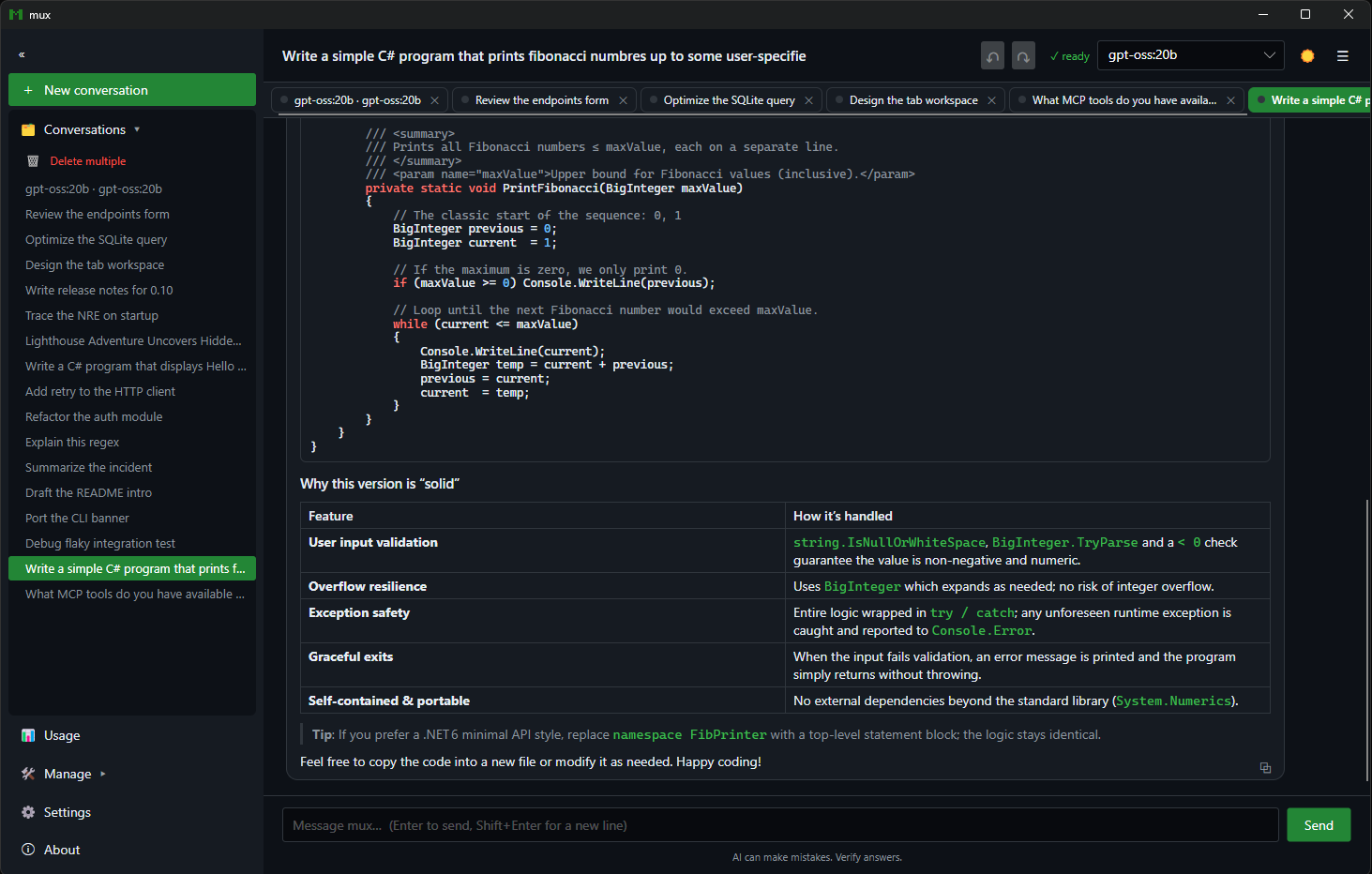
A native desktop app for daily driving

mux Desktop links the engine in-process: streaming chat with Markdown, tables, and syntax-highlighted code; parallel conversation tabs that each run their own agent turn concurrently; AI-summarized titles; a command palette; and the full configuration surface.

  • Parallel tabs — switch between conversations mid-turn without blocking
  • 11 languages with a live switcher and right-to-left support, plus a high-contrast theme
  • Per-response copy, rename, export, bulk-delete, and a Ctrl+K command palette
  • The same endpoints, MCP, skills, and subagents managers, natively
mux desktop app showing a tabbed chat with syntax-highlighted C# code and a comparison table

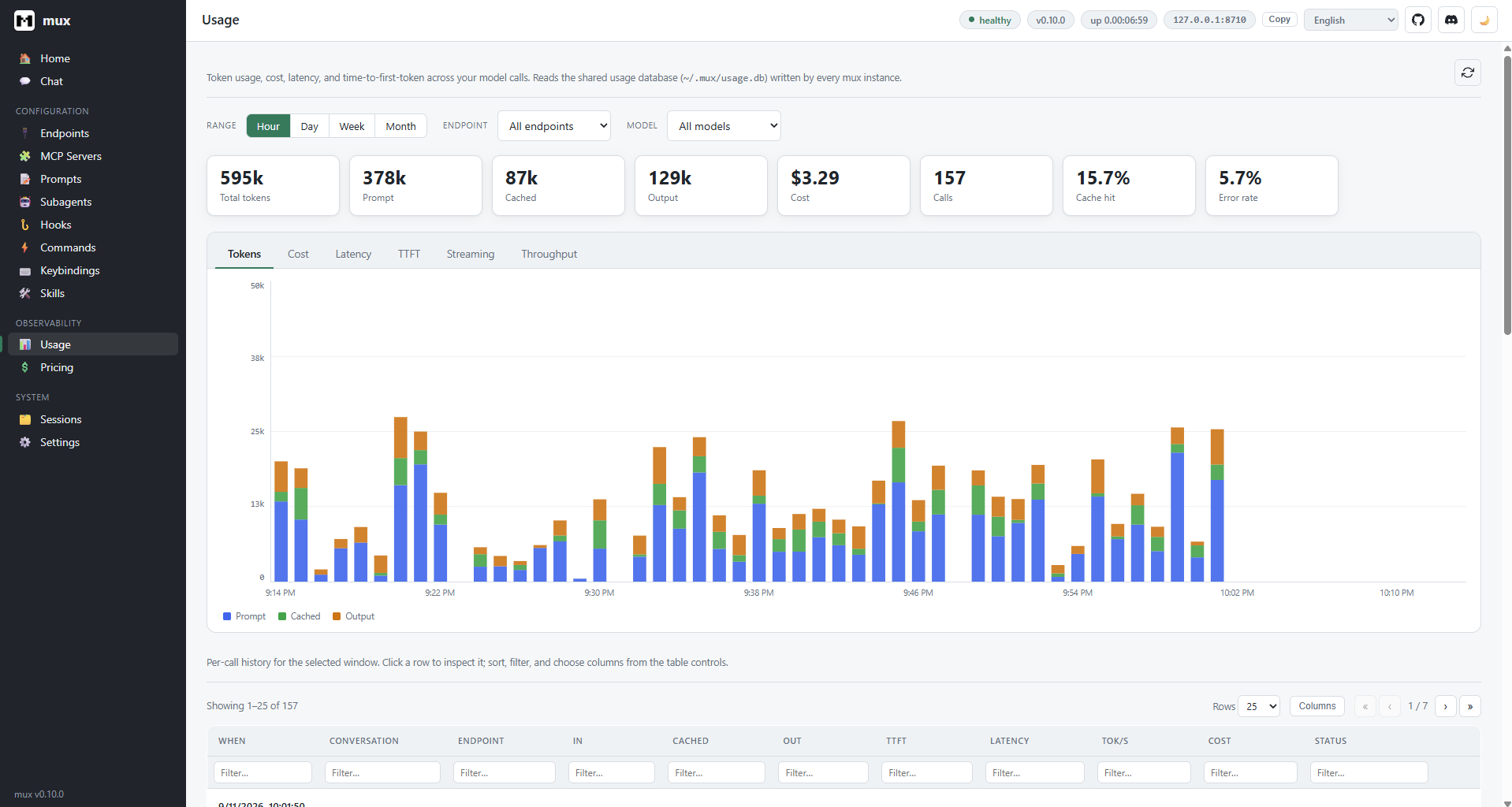
Observability, built in

Every model call is recorded to a local SQLite database — tokens, cost, latency, time-to-first-token, streaming, and throughput. Explore it as charts over time, filtered by endpoint and model, in both the dashboard and the desktop app.

  • Tokens, cost, latency, TTFT, streaming, and throughput views
  • Filter by endpoint, model, and time range — hour, day, week, month
  • Cost derived from an editable pricing.json
mux usage dashboard showing token, cost, and latency charts with per-call history
Extend & compose

MCP, skills, and subagents — built in

mux isn't a closed box. Plug in tool servers, encode repeatable procedures, and delegate scoped work to isolated agents — all configured in plain files or managed live in-app. It works the other way too: mux mcp serve makes mux itself an MCP server.

MCP tool servers

/mcp · mcp-servers.json

Define stdio or HTTP Model Context Protocol servers and mux connects live on startup — discovering each server's tools, exposing them to the model, and showing per-server connectivity, with the exact cause when one fails (connection refused, HTTP status, response body). Add, edit, or remove servers without a restart. And with mux mcp serve (stdio or Streamable HTTP, built on Voltaic), Claude Code, Codex, or another mux can hand mux a task through its run tool, under an approval ceiling you set.

mcp-servers.json
{
  "name": "filesystem",
  "transport": "stdio",
  "command": "npx",
  "args": ["-y", "@mcp/server-fs"]
}

Skills

/skills · ~/.mux/skills

Versioned Markdown-plus-code capabilities that turn a fuzzy request into a fixed, deterministic procedure — the Markdown carries judgment, the code carries determinism. 212 curated defaults ship on first run, plus 166 more in 10 opt-in packs, covering git, code review, security review, dependency audits, debugging, loops, JavaScript, Python, React and the major web frameworks, Java, C/C++, Go, Rust, Ruby, PHP, .NET, Swift, Android, Flutter, read-only SQL, NoSQL, and graph databases (LiteGraph included), Docker, Kubernetes, Helm, Terraform, Ansible, Bicep, and the major clouds, each listed only where it applies. Run one with /<skill>, check skills into your repo (Claude-format skills work as-is), author your own in-app, and measure how reliably the model picks them with mux skill eval.

SKILL.md
---
name: git-commit
description: Stage & commit changes
mutates: true
commands: [run]
---

Subagents

spawn_subagent · subagents.json

Delegate a scoped sub-task to a named subagent. Each runs in an isolated conversation — its own system prompt, endpoint, and tool allow-list — and returns only its final answer, keeping the primary agent's context clean. Set "isolation": "worktree" and it works in its own git worktree on a mux/ branch: unchanged worktrees clean themselves up, and finished work waits on its branch for you to merge.

subagents.json
{
  "name": "reviewer",
  "endpoint": "gpt-oss-local",
  "allowTools": ["read_file",
    "grep"],
  "isolation": "worktree"
}
The full toolbox

And a whole lot more

Beyond MCP, skills, and subagents, mux ships a deep set of capabilities for engineers building agents and agentic workflows — not a thin wrapper around a chat endpoint.

Live, portable sessions

Terminal, desktop, web, and VS Code share one session store, so a conversation started in any surface mirrors live into every other — full transcript intact, in any order, no manual refresh. Every surface can resume, rename, duplicate, export, and delete the same sessions; web chats persist server-side and record their working directory — which you can repoint mid-session with /cwd.

Built-in tools

File read / write / edit / multi-edit / delete, directory ops, glob, grep, process execution, background processes for dev servers and watchers (/processes), persistent memory (remember, # quick-add), ask_user, and rendered web retrieval — ready on turn one. Type @path to attach files to a prompt.

MCP tool servers

Define stdio / HTTP servers in mcp-servers.json or manage them with /mcp. mux connects live, discovers their tools, and exposes them to the model. mux mcp serve exposes mux to other MCP clients in turn.

Skills

Versioned Markdown-plus-code capabilities that turn a fuzzy request into a fixed, deterministic procedure. 212 curated defaults ship on first run, from code-review and fix-until-green to database, mobile, Kubernetes, and cloud CLIs, with 166 more in opt-in packs; author your own in-app.

Subagents

Delegate a scoped sub-task with spawn_subagent. Each runs in an isolated conversation — its own prompt, endpoint, and tool allow-list — and returns only its final answer. Opt into a git worktree per subagent so parallel work never collides; mux worktree and /worktrees tidy up.

Background tasks

The model breaks big work into a task DAG and tracks it live — pending → running → done. A task_plan_updated event streams to orchestrators in JSONL mode. Plan mode (/plan, Shift+Tab) explores read-only first, and /loop re-runs a prompt on an interval or self-paced.

Undo / redo

In a git repo, mux snapshots the working tree before each turn so /undo and /redo roll file changes back and forward — your branch, history, and stash untouched.

Usage analytics

Every model call is recorded to a local SQLite database — tokens, cost, time-to-first-token, latency, throughput. View it via /usage or the dashboard's charts.

Sandbox & approvals

Confinement postures (read-only, workspace-write), tool allow/deny globs, and approval policies — ask, auto, or deny. Or --yolo for full trust.

Plugins & hooks

Out-of-process event hooks (session-start, user-prompt-submit, session-end, and tool-level pre-tool-use, post-tool-use, stop with Claude Code's contract) and custom /slash commands configured in hooks.json.

Reasoning effort

One control — off to high — mapped per backend: reasoning_effort for OpenAI, a thinking budget for Gemini, think for Ollama. Optionally surface the model's thinking behind a collapsible disclosure — consistent across web, desktop, and VS Code.

Web search & retrieval

web_search discovers results via Tavily or You.com; web_retrieve fetches any URL with a headless browser and returns rendered text, title, and status.

Engine as a library

Mux.Core and Mux.Search publish to NuGet with symbols — build your own experiences on AgentLoop, SessionStore, McpToolManager, and more.

Ridiculous configurability

Tune every knob. Or none of them.

Sensible defaults on first run, and a setting for everything underneath. Config lives in plain JSON under ~/.mux — or a fully isolated directory via MUX_CONFIG_DIR.

01

Endpoints & models

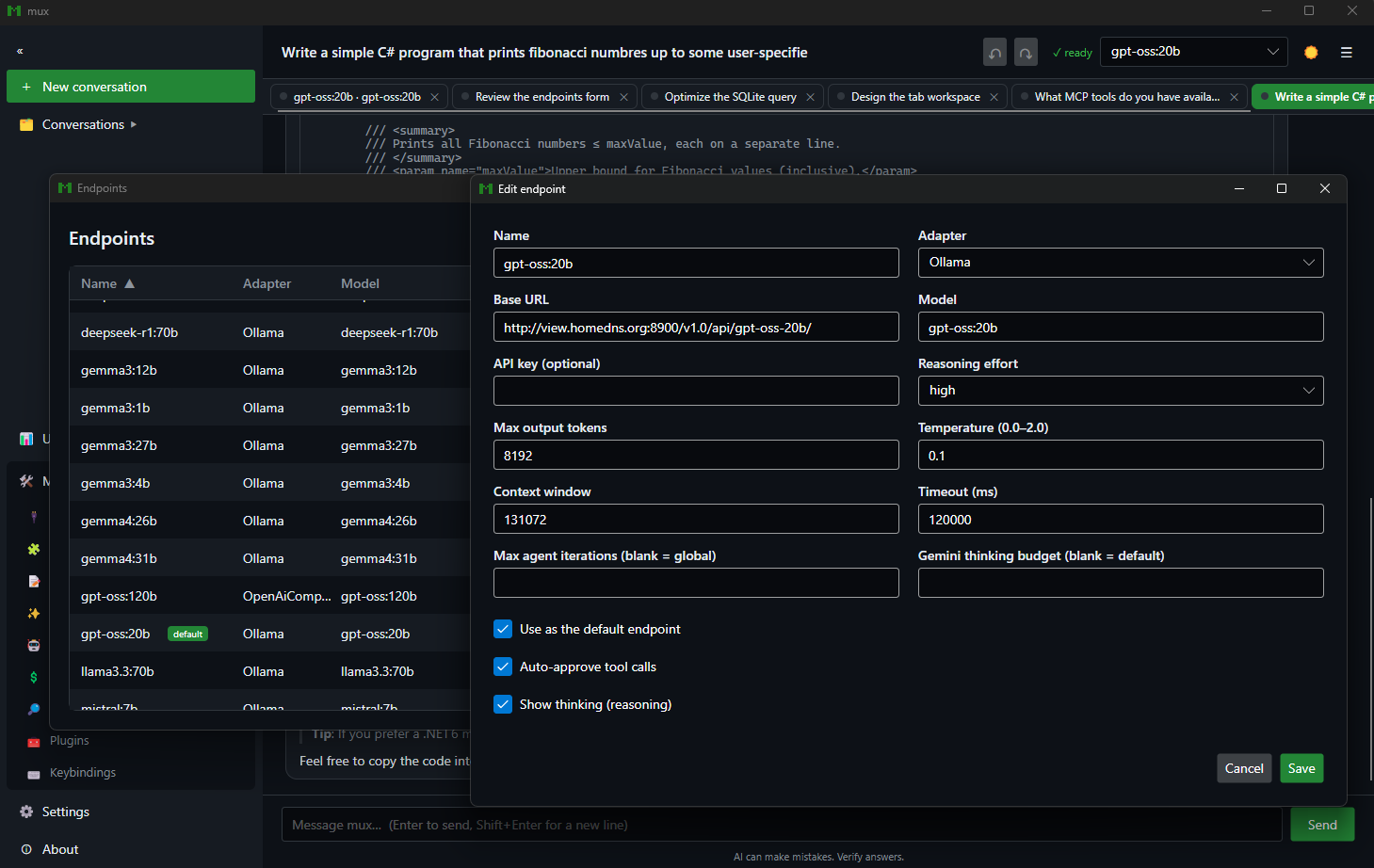
Adapters, base URLs, auth modes, per-endpoint reasoning effort, auto-approval, and iteration caps.

02

Prompts & behavior

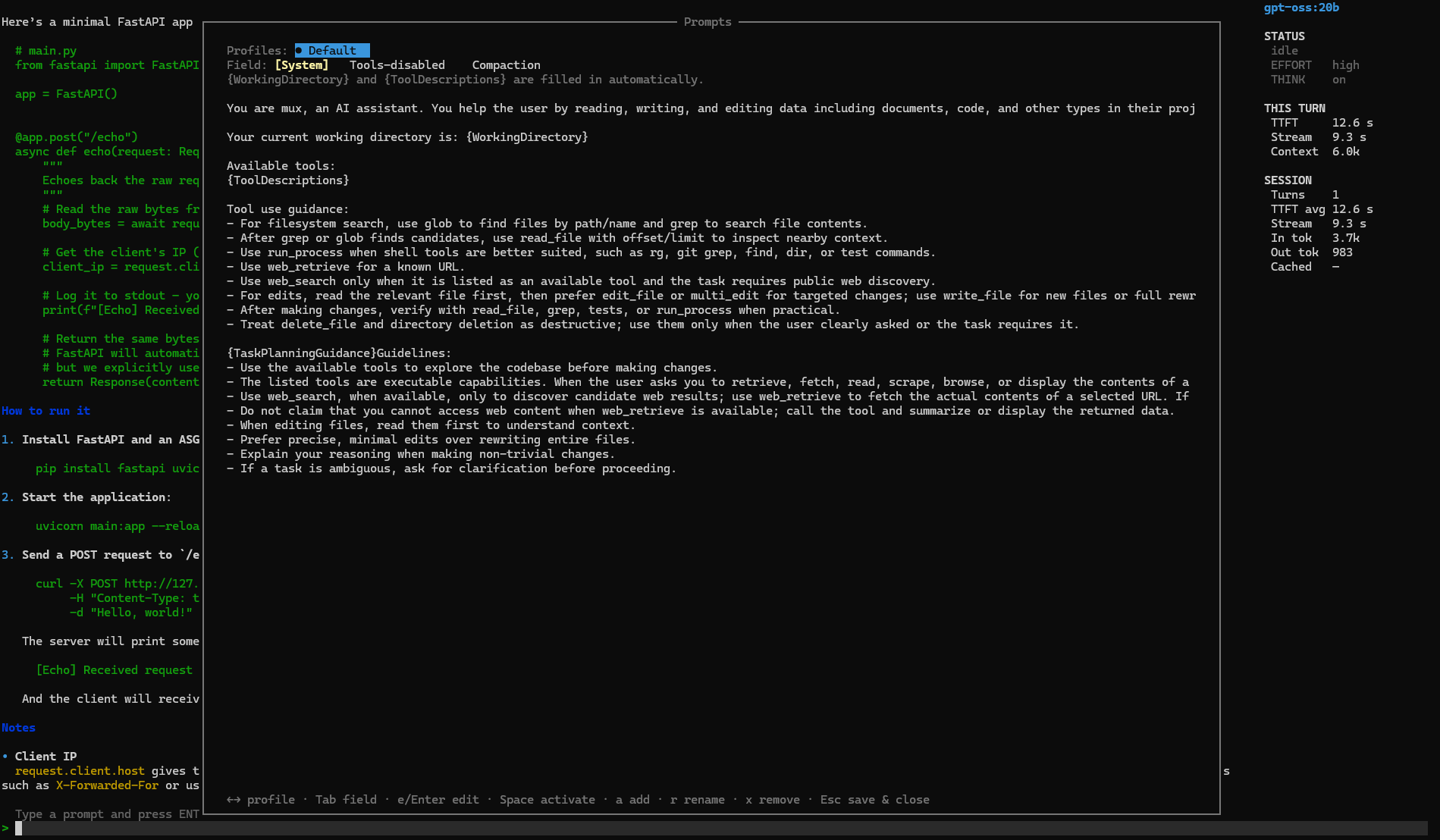
Custom system prompts, prompt profiles, compaction strategy, token budgets, temperature, and max turns.

03

Keybindings & theme

Rebind or unbind any command's key chord, toggle borders and sidebar, and pick light / dark / system theming.

04

Pricing & providers

An editable pricing.json drives cost analytics; configure MCP servers, skills, subagents, and web-search providers.

~/.mux/endpoints.json
// swap models without touching a line of code
{
  "name": "gpt-oss-local",
  "adapterType": "ollama",
  "baseUrl": "http://localhost:11434",
  "model": "gpt-oss:120b",
  "reasoningEffort": "high",
  "autoApproveTools": false,
  "showThinking": true,
  "auth": {
    "mode": "bearer",
    "token": "${OLLAMA_TOKEN}"  // from env
  }
}
A closer look

Every knob, on every surface

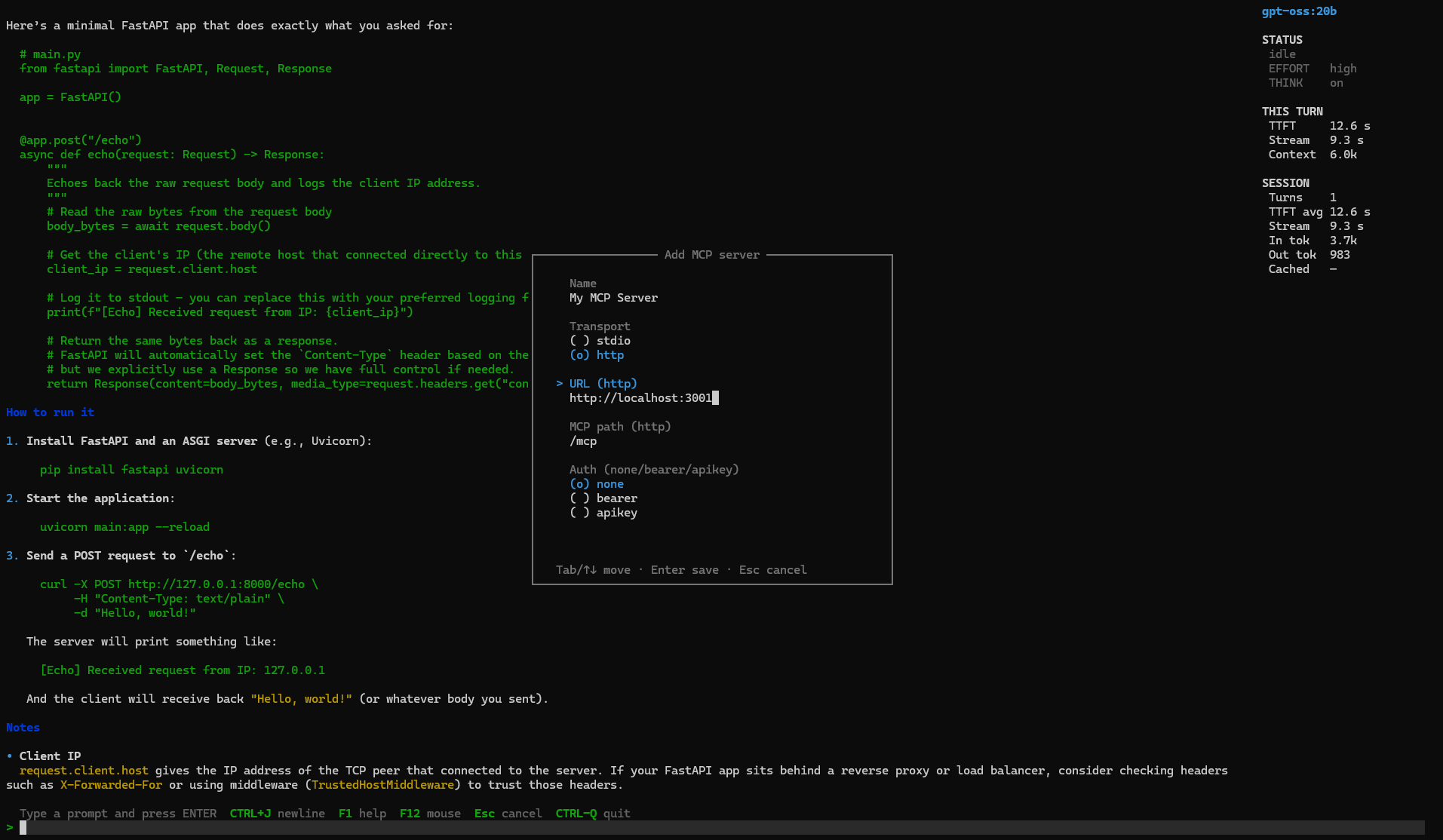
Endpoints, MCP servers, prompts, and profiles are all managed in-app — guided forms in the terminal, and the same managers natively in the desktop client.

Automate everything

Headless, deterministic, orchestratable

Drive mux from scripts, CI, or your own orchestrator. Machine-readable JSONL emits one event per line; thin SDKs wrap the same contract in TypeScript and Python. Agents can call mux over MCP with mux mcp serve.

bash — run a task and stream structured events
# one machine-readable event per line: run_started, tool_call_*, task_plan_updated, run_completed
mux print --output-format jsonl --output-last-message result.txt --yolo \
  "implement the feature described in TASK.md"

# constrain the final response to a JSON Schema, or connect MCP servers for one run
mux print --output-schema schema.json --mcp-config mcp.json --yolo "extract the release notes"

# or let another agent drive mux: register it as an MCP server
claude mcp add mux -- mux mcp serve --approval-policy auto-safe
TypeScript — @mux/sdk
import { Mux } from "@mux/sdk";

const mux = new Mux({ yolo: true, sandbox: "workspace-write" });
const result = await mux.run("implement the feature in TASK.md");

console.log(result.text, result.exitCode);
Python — mux-sdk
from mux_sdk import Mux, MuxOptions

mux = Mux(MuxOptions(yolo=True, sandbox="workspace-write"))
result = mux.run("implement the feature in TASK.md")

print(result.text, result.exit_code)
Up and running in minutes

Get started

You bring the inference backend; mux connects to it. No Docker, no vendor account required.

1

Start a model runner

mux never manages runners — bring your own local or remote backend.

ollama pull qwen2.5-coder:7b
2

Clone & install

Install scripts default to .NET 10 when available and fall back to .NET 8.

git clone && install-tool
3

Run it

First launch writes editable endpoints.json and settings.json.

mux
Dig deeper

Extensively documented

Your agent. Your models. Your rules.

Clone the repo, point mux at any backend, and run mux. The rest is yours to configure.